How to self-publish a book: A guide for independent publishers
Interested in joining the world's leading print on demand platform?
Getting books and magazines into print has traditionally meant accepting a level of financial risk that puts most independent publishers off before they even start. Minimum runs of several hundred copies, money committed before a single copy sells, boxes of unsold stock in spare rooms – the economics of traditional print simply don’t work at small scale.
Print on demand works differently. You list your publication for sale and print each copy only when an order comes in. No minimum run, no unsold stock, no storage costs. This guide explains how to self-publish a book – from comparing self-publishing platforms to uploading your print file and making your first sale.
In short
With print on demand, you only pay for copies that sell. There are no setup costs, minimum orders or stock to manage. You set the retail price, Prodigi handles production and fulfilment, and you keep the margin.
What does self-publishing involve?
Self-publishing means taking a publication to print without going through a traditional publisher. Rather than pitching to an editor and waiting for approval, the author or creator owns the entire process – commissioning the design, managing production and setting the retail price. The trade-off is that you take on the work and the cost, but you keep full control and a much larger share of the revenue.
It’s a model that suits a wide range of creators: photographers producing photo books, illustrators self-publishing art books, writers releasing collections independently and editors building niche magazines for audiences too small to interest a commercial publisher. What they have in common is that print on demand makes the economics work regardless of scale.
Who uses self-publishing platforms?
Independent creators and businesses of all kinds – artists, photographers, illustrators, writers, small publishers and brands producing print collateral for their customers or stakeholders.
What most of them have in common is that they already have an audience – however small – and they want to sell directly to that audience without giving up margin or creative control to a distributor or publisher. Self-publishing platforms make that straightforward. You set the price, own the relationship with your readers and print only what you sell.
Every publication format, covered
Our range of books and magazines covers everything from premium hardcover photo books to PUR-bound magazines – each with their own cover finish, paper type and page count.
Photo books
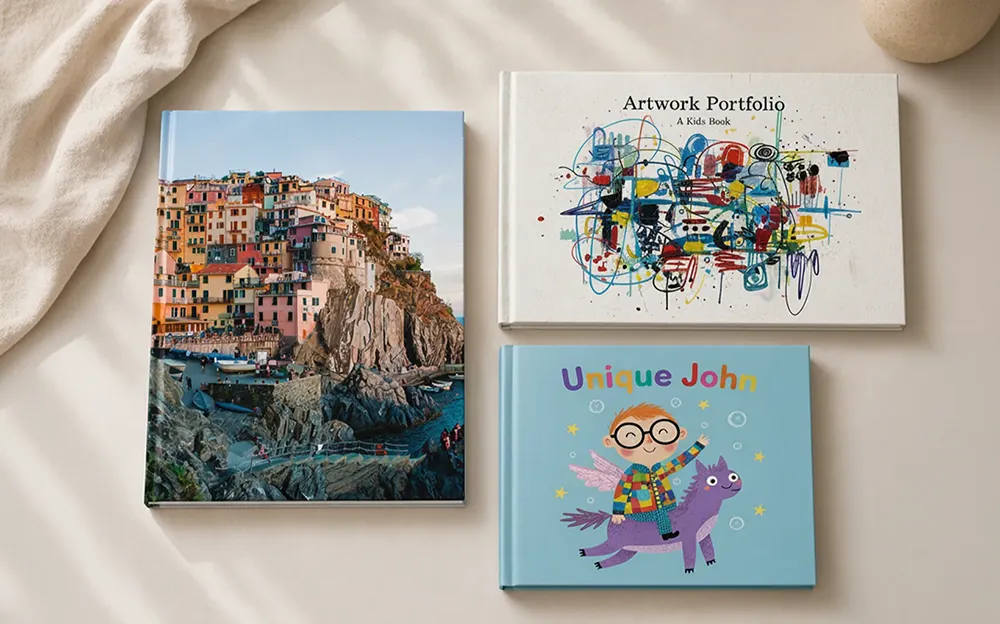
Hardcover and softcover books, lustre or matte paper. Layflat books, gloss paper. Ideal for photographers, artists and visual storytellers.
Choosing the right format for book printing
The right format depends on what you’re publishing. A text-heavy book – a novel, a collection of essays, a how-to guide – has different requirements to a photography book or an art catalogue, and the platform you use should reflect that.
For text-led publications, the priorities are paper weight, binding durability and legible typography at small sizes. For visual publications, print quality has the most direct bearing on how the finished product is received – the visual layout is the product, which means paper finish, colour accuracy and binding all matter in a way they simply don’t for a paperback novel.
Prodigi PUR-bound photo books are available in hardcover and softcover, with lustre and matte paper finishes to suit different aesthetics. Lustre paper works well for vibrant, colour-rich photography, while matte paper gives a flatter, more gallery-appropriate feel. Layflat books are available where a gutter crease would interrupt a panoramic spread or double-page image.
Magazines

Matte and glossy magazines, silk-coated paper. Ideal for independent magazine publishing and zine printing.
Choosing the right format for magazine printing
The main decision for most independent publishers is cover finish. A gloss cover reads as commercial and newsstand-ready, while a soft-touch matte finish tends to suit more editorial or design-led publications where the tactile quality is part of the appeal.
Prodigi magazines use PUR binding on a silk-coated interior. Both gloss and matte cover finishes are available, so the choice comes down to the aesthetic you’re going for and the readership you’re appealing to.
How to self-publish a book or magazine

The specifics vary depending on the format you’re producing, but the broad steps are consistent across most self-publishing projects. If you already have your content ready and just need a platform, skip to the platform comparison.
-
Design your content
Most self-publishing platforms (including Prodigi) require print-ready PDF files, so it’s worth familiarising yourself with the relevant file specifications – trim size, bleed, resolution – before you finalise your design.
-
Assemble & export your print file
Design your interior pages and cover, then export both as a single PDF – the first page becomes your front cover, the last your back cover.
Set your resolution to 300dpi and your colour profile to RGB, and keep all critical elements at least 10mm from the edge of each page. Don’t add bleed or crop marks – our system generates these automatically.
Export using the PDF/X-4 (coated FOGRA 39) setting, with fonts embedded and transparencies flattened.
-
Choose your preferred platform
There are meaningful differences between self-publishing platforms – in product range, pricing structure, fulfilment locations and integration support. The section below covers what to look for before you commit.
-
Upload your files & place an order
If you’re using Prodigi, upload your PDF via the Prodigi dashboard or integrate via our print API. Select your publication, then review the digital proof before confirming. You can order a single copy to check quality before listing your publication for sale.
-
Set your pricing
Your retail price sits above production cost – the difference is your margin. You’ll also need to factor in shipping costs and whether you’re selling direct or routing orders through a marketplace like Etsy, which takes a percentage of each sale.
-
Create your product listing
Before you connect Prodigi to your storefront, you’ll need to set up your product listing – including a title, description, pricing and product images.
-
Connect your store & start selling
Link Prodigi to whichever ecommerce platform you use. Once you’ve connected your shop or website and configured your products, orders placed in your store will be sent automatically to Prodigi for printing and fulfilment – no manual processing required.
Comparing self-publishing platforms
One of the most common questions about how to self-publish a book is which platform to use. There are two broad types, and they serve different needs.
Distribution platforms – Amazon KDP and IngramSpark being the most widely used – list your book in their own retail catalogue and handle fulfilment through their network. The advantage is discoverability; the trade-off is that you give up control over pricing and branding, and the royalty structure limits your margin.
Fulfilment platforms – like Prodigi and Lulu – work the other way around. They print and ship when orders come in from your own shop, leaving pricing, branding and the reader relationship entirely in your hands. For creators who already have an audience, that control is usually worth more than the discoverability a distribution platform offers.
| Factor | Fulfilment platform (e.g. Prodigi) | Distribution platform (e.g. KDP) |
|---|---|---|
| Retail listing | You manage your own shop | ✓ Listed in the platform's catalogue |
| Pricing control | ✓ Full control over retail price | Platform sets royalty structure |
| Branding | ✓ 100% white-label | Platform branding on orders |
| Product range | ✓ Photo books, magazines & more | Primarily text-heavy books |
| Minimum order | ✓ No minimum – order one copy | ✓ No minimum – order one copy |
| Best for | Creators with their own audience & shop | Authors seeking discoverability on Amazon |
Self-publish a book or magazine with Prodigi
Prodigi is a print on demand platform with a global print network spanning 100+ print facilities. Signing up is free, there are no monthly fees or minimum order quantities – you pay only when an order goes to production.
Before committing to a format, it’s worth ordering a custom sample. It’s the most reliable way to judge paper quality, binding and colour reproduction – things that look fine on screen but only reveal themselves properly in print.
If you’re planning to order multiple publications, Prodigi Pro is worth considering. Subscribers get 15% off all books and magazines, which can make a big difference once you start scaling orders.
Frequently asked questions
How do I self-publish a book or magazine with no upfront costs?
Print on demand platforms like Prodigi let you self-publish with no upfront costs. There are no setup fees, no minimum order quantities and no subscription charges. You only pay when an order goes to production – meaning you can list your publication for sale and only print copies when you need them.
What is the best self-publishing platform?
Prodigi is a strong choice for self-publishing, particularly if you already have an audience and want to sell direct. For authors looking for broader retail discoverability, a distribution platform like Amazon KDP or IngramSpark may be a better fit.
What is the difference between self-publishing and traditional publishing?
Traditional publishing involves a publisher funding production and distribution in exchange for a share of revenue and rights. Self-publishing means the creator retains full control and funds production themselves. With print on demand, there are no minimum orders or setup costs – removing that financial barrier.
Do I need an ISBN to self-publish a book?
An ISBN is not required to self-publish a book, but it is needed if you want your book listed in retail catalogues or stocked by bookshops. For books sold directly through your own shop – such as photo books, art books or community publications – an ISBN is not necessary. In the UK, ISBNs are issued by Nielsen.
Can I sell self-published books and magazines through Shopify or Etsy?
Yes. Prodigi integrates with Shopify, Etsy, Wix and other major ecommerce platforms. Once you’ve created your product listings, connected your storefront to Prodigi and configured your products, orders will be sent automatically for printing, packing and shipping – no manual processing required.
How long does it take to fulfil a self-published book order?
Production times vary by format:
- Softcover photo book
- 96 hours
- Layflat photo book
- 96–144 hours
- Magazine
- 96–144 hours
- Hardcover photo book
- 120 hours
Shipping time is additional and varies by delivery destination and shipping service. Read our shipping FAQs for more information.
What paper stocks are available for Prodigi books and magazines?
Each format has different paper options, page counts and size ranges – here’s a full breakdown to help you choose:
| Hardcover photo book | Softcover photo book | Layflat photo book | Magazine | |
|---|---|---|---|---|
| Cover | Matte-laminate hardcover | Matte-laminate softcover | Matte-laminate hardcover | 250gsm laminated softcover, matte or gloss |
| Pages | 24–300 (up to 500 on 150gsm gloss) | 20–300 | 18–122 | 20–500 |
| Paper | Gloss or uncoated Mohawk Superfine Eggshell Ultrawhite | Gloss or uncoated Mohawk Superfine Eggshell Ultrawhite | Gloss-coated E-Photo Lustre | Silk-coated |
| Paper weight | 120gsm (matte), 150gsm or 200gsm (gloss) | 120gsm (matte) or 150gsm (gloss) | 190gsm | 115gsm |
| Binding | PUR | PUR | Layflat | PUR |
| Sizes | A5 to A4, square 8.3x8.3" | A5 to A4, square 8.3x8.3" | 8.3x8.3", 11.7x11.7", A4 landscape | A5, A4, Letter |
| Orientations | Portrait, landscape, square | Portrait, landscape, square | Landscape, square | Portrait, landscape |
Ready to start your self-publishing journey? Sign up for free – no minimum orders, no setup costs and no monthly fees.
Products in this article

Further reading
-

The 3 best custom Valentine’s Day gifts to sell online in 2026
13 January 2025
-

Etsy's new AI photo rules: What print on demand sellers need to know
22 October 2026
-

Unique Valentine’s Day gifts for your online store
18 January 2023
-
Verisart X Prodigi: Mint & sell NFTs on Shopify
9 November 2022