Behind Prodigi API v5: A Q&A with Head of Product Ed Parry

Tags
Interested in joining the world's leading print on demand platform?
With the launch of Prodigi API v5, merchants now have greater visibility and control across the entire order lifecycle, directly from their own systems.
But the latest version of our print API is about more than bringing dashboard-level order control to developers. It lays the foundations for more sophisticated automation, future AI agent integrations and greater end-to-end print on demand supply chain transparency.
We caught up with Ed Parry, Head of Product at Prodigi, to find out what went into building v5, why we made some of the decisions we did and what merchants can expect from the platform in the future.
What prompted the decision to rebuild the API? What wasn’t working as well as it should in v4?
The previous version of our API was built to do one thing and do it well: place orders and get them into our network. Since then, our service has come a long way, and so have our merchants’ expectations. They’re running businesses, and Prodigi is their print on demand partner.
Today, the dashboard lets you create and manage products, publish them to your store and manage your orders and print files. Over time, it became clear that the API wasn’t giving merchants the same level of access.
Our aim with v5 was to close that gap so merchants could build solutions that fit the way they run their businesses. We built it with AI and agentic development in mind, too, wanting to make it easier for merchants to use coding agents to build their own integrations with Prodigi.
Were there particular limitations merchants kept running into? Why build v5 rather than keep extending v4?
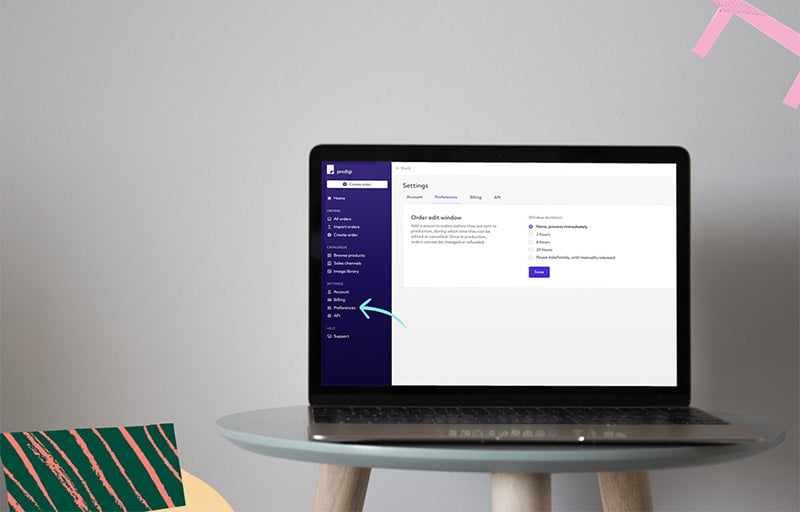
The biggest gap we wanted to address quickly was giving merchants full control over their orders. Last year, we introduced the ability to pause orders before they reached fulfilment. That gave merchants time to make edits and gave their customers a window to cancel orders for personalised items.
The way we’d built that feature meant exposing it through v4 would have required a lot of reorganisation. That, together with our aim of making the full functionality of Prodigi available through an API we could build on in the future, drove the decision to build v5.
We paid particular attention to making the upgrade path as smooth as possible. For merchants who use v4 simply to place orders, that process should feel very familiar in v5.
What does dashboard-level order control mean for merchants in practice?
You can manage the same order through the Prodigi dashboard or through the API integration if you’re building your own apps and workflows.
Take a store selling personalised pet portraits. When a customer places an order, you can create it with us through the API using the details you already have, like the delivery address and the product you’d like us to make. You can save the order while you create the artwork and, if needed, get it signed off by the customer.
Once the artwork’s ready, you can add it to the open order through the dashboard or the API. An order created through the API can be viewed and managed in the dashboard, and vice versa.
When you’re happy the order is complete, you can submit it to production. Your integration can subscribe to updates – for example, when the order goes into print or when it’s packaged and ready for dispatch.
We’re working on extending those updates through to delivery, too, so you can be notified when an item is out for delivery and when it’s been delivered.
Why did we move to draft-first order creation, and what difference will it make to merchants?
We moved to a draft-first approach to give merchants more control. Many merchants already have everything they need when they place an order with us, and the usual workflow works well for them. With personalised products, though, the order often comes in before the artwork is ready.
If you have an automated ecommerce integration with Shopify, Etsy or another supported platform, we can receive the order as soon as it comes in and keep it linked to the original order. You then have time to add the personalised artwork. Once you submit the completed order to production, we can automatically update the original order in your store.
Draft orders and configurable pauses let you give customers time to make changes, too. With a six-hour pause, for example, a customer has time to cancel, correct their delivery address or switch to a different product variant before the order goes into production.
For existing API users, I think having more control over orders throughout their lifecycle will make the biggest difference. For new users, the real opportunity lies in being able to build their own solutions on top of the Prodigi platform. We’re excited to see what merchants create.
What makes v5 easier for AI agents and automated tools to work with?
We spent a lot of time making v5 easy to work with for both developers and agents. Much of that comes down to well-organised endpoints and clear, comprehensive documentation.
Documentation is often the first place a coding agent looks to understand what’s possible and what it needs to build an integration. We followed modern API design standards so the objects are clear and it’s easy to see what each endpoint expects.
We paid particular attention to API responses and error messages, too. We want developers and agents to understand what happened, why something failed and what they can do next.
AI and agentic development are moving quickly, so we’re keeping a close eye on how they evolve. We’re looking at things like Model Context Protocol (MCP) server support as part of making the print API accessible to as many developers and tools as possible.
How do features like draft orders, upfront quotes, duplicate protection and access to paused orders make automation more reliable?
These features are all designed to make the status of an order clear and set expectations as early as possible.
Draft orders let merchants start an order with Prodigi and add to it over time. If an order for personalised artwork comes in from Shopify and the artwork follows a few hours or even days later, it can all go on the same Prodigi order. That order stays linked to the original Shopify order, so updates go back to the right place.
With v4, a merchant using both the dashboard and the API integration could see a different set of orders in each because paused orders were only visible in the dashboard. With v5, they can see those orders and their current status in both places.
Upfront quotes let merchants check that the order they want to place is valid, confirm product availability and see the price before they commit.
If an integration submits an order and the response times out, it can retry using the same idempotency key. If the order already exists, we tell the integration. Otherwise, we create it. That means a slow or missing response won’t lead to a duplicate order.
What can’t developers do with v5 today?
We’re still actively developing v5, and we’ll be adding capabilities over the coming weeks and months. It already has feature parity with v4, along with access to the Prodigi product catalogue, live pricing quotes and the ability to create and manage print files and assets.
We plan to add API access to dashboard settings and billing information, including order invoices, as well as full access to our recently launched product creation and publishing feature.
What did you deliberately leave out of the initial release?
We prioritised orders. One of the clearest pieces of feedback on v4 was that merchants needed API access to draft and paused orders. We focused there first, so the initial release covered what merchants could already do in v4 while giving them more control over their orders.
We established the documentation and API contracts from the first release, including how we handle errors, how callbacks work and how endpoints are structured. As we add functionality, we can follow those same patterns and reduce the chances of introducing breaking changes.
How much work is involved in migrating from v4, and where should merchants start?
We’ve tried to keep the work involved in moving from v4 to v5 to a minimum. For most merchants, it should be quick to switch. We kept changes to the order objects and the information you need to place an order as small as possible.
We have a migration guide, and we’d recommend starting with your existing order flow. Once that’s working, if draft orders suit your business, you can update your integration to create drafts automatically.
You can also store your print files in the Prodigi image library. When you place an order, you can reference each file by its ID instead of supplying a publicly accessible URL each time.
Do existing API users need to migrate immediately?
Existing print on demand merchants can plan their migration at their own pace for now. V4 will remain available and supported throughout the first half of 2027, after which we’ll look at deprecating it. There’s no confirmed date yet, and we’ll let all users know as soon as there is.
How does v5 lay the groundwork for what comes next?
V5 is a significant change in how we structure our services and how they talk to each other. It gives merchants more access to Prodigi so they can build solutions that work for their customers.
We’re using the new API ourselves and have several projects in the pipeline that will build on v5. We’re equally excited to see what merchants come up with.
Our goal is to make everything you can do in the dashboard available through the print API. We’ll be working towards that through the first part of 2027.
Where do you see AI agents fitting into Prodigi, and what needs to happen before we get there?
This area is moving so quickly that anything we say now could be out of date before long. As we open up more of Prodigi through the API, agents will be able to handle more of the tasks merchants do themselves today.
We’re close to launching official plugins for ChatGPT and Claude, which will give merchants access to their Prodigi accounts through those services and their agents.
You could have an agent monitor orders and flag issues, or spot a delivery address change in Shopify and update the corresponding order in Prodigi. It could even upgrade shipping on your behalf as you get closer to the last order dates before Christmas.
Customer service is another area. If a customer emails asking for an update, an agent could check where the order is and send an answer without you having to get involved.
The groundwork is in place. We’re looking at adding more granular user roles for merchants with customer support teams. For example, a merchant could limit a support agent’s permissions to viewing orders and changing delivery addresses.
For our third-party plugins, we’re paying close attention to authorisation and confirmation. We want merchants to decide what access they grant and stay in control of the actions an agent takes on their behalf.
What are you personally most excited about now that v5 is live?
We spent a lot of time working on this in the background, so I’m excited that it’s out there and merchants can use it. The feedback from our first users and testers has been really promising. I’m particularly excited to see what merchants build as agents get more access to the platform.
We’re using the new API to build and extend our own platform, so we’re heavily invested in its future, its reliability and its performance. V5 makes several projects we’ve always wanted to build much more achievable. We’re excited to get started on those, and we’ll have more to share in the new year.
It’s an incredible time to start a business. AI and agentic coding are making it possible to build so much more, and we still value the human creativity behind what gets made.
That puts print on demand merchants in a great position. They can use these tools alongside their own designs and ideas to make something distinctive for their customers.
V5 is one small part of that. We hope it makes it easier for people to put their ideas into practice, reach customers and run their ecommerce businesses.
Explore Prodigi API v5
Whether you’re building your first print on demand API integration or looking to get more out of an existing one, you can find everything you need to get started below.
- What’s new in Prodigi API v5
- How to migrate from API v4 to v5
- Explore our API documentation
- Learn more about our print API
Got any questions about v5 or integrating with Prodigi? Get in touch at support@prodigi.com.